I spent most of a day chasing this down, so I’m documenting the setup that finally worked for me.
If you’re running Minecraft Bedrock through playit.gg and the 1.26.51 update suddenly stopped remote players from connecting, the old single UDP tunnel setup is no longer enough.
With NetherNet, you now need two separate paths:
There’s also a nasty issue in 1.26.51.1 where the UDP ports advertised to players need to match the local UDP ports exactly. If they don’t, the server can start normally while never actually opening the expected listener.
This is currently working for me from outside the LAN without any router port forwarding.
After the update, I started seeing this:
Your current connection type is not set to NetherNet.
In this release, NetherNet is the only supported transport type.
Players will not be able to connect to your game without NetherNet.
The important change is that RakNet is gone in 1.26.51.1.
Previously, Bedrock mainly used UDP 19132, and a normal playit.gg Bedrock tunnel handled that.
NetherNet changes the connection flow.
The first part of the connection happens over TCP on port 19132. The same endpoint is also used for the server information request. For example:
GET /v1/join
returns JSON containing the server information.
The actual gameplay traffic is then handled separately over UDP.
That UDP traffic does not use the same TCP tunnel. It needs to be able to reach the server independently.
This means the old UDP-only Bedrock tunnel is no longer sufficient by itself.
The documentation says that only signaling traffic on server-port needs to go through the proxy, while gameplay traffic travels directly between the client and server.
I initially interpreted that to mean the UDP portion would automatically work through NAT.
That wasn’t the case in my setup.
What it actually means is that the UDP gameplay traffic does not travel through the signaling proxy. It still needs a usable route to the server.
This made troubleshooting confusing because local connections worked perfectly.
A computer on the same LAN could connect because it didn’t need to cross the router.
Remote players could see the server name and information, but connecting failed with:
InitialConnection-83   codeword: Door
Transport: NetherNet:2193
If you can see the server in the list but fail during InitialConnection, your TCP signaling is probably working and the UDP gameplay path is what needs attention.
The biggest problem I ran into involved server-udp-ports.
The documented format allows mappings like:
ip:external:internal
However, with 1.26.51.1 I could only get it to work when the external and internal UDP port numbers were exactly the same.
These examples worked:
19140-19155
19140-19143:19140-19143
<playit-ip>:61226-61229:61226-61229
These did not:
61226-61229:19140-19143
<playit-ip>:61226-61229:19140-19143
When using different internal and external ports, the server still printed:
Server started.
but never opened the expected listener.
There was no useful error message.
So if playit gives you ports 61226-61229, configure the Minecraft server to use 61226-61229 locally as well.
In other words, make the server match the playit assignment instead of trying to translate the ports.
You can check whether the server actually opened the listener with:
docker logs <container> | grep "Accepting clients"
If nothing is returned, there’s a good chance the server-udp-ports value is preventing NetherNet from binding correctly.
As a quick sanity check, switching temporarily back to something simple like:
19140-19155
should allow the listener to come up again.
I also had to switch the container to host networking.
With standard Docker bridge networking, the Bedrock server was collecting network candidates from inside the container and advertising an internal container address that remote clients couldn’t use.
My compose file uses:
network_mode: host
The TCP and UDP sides behave slightly differently.
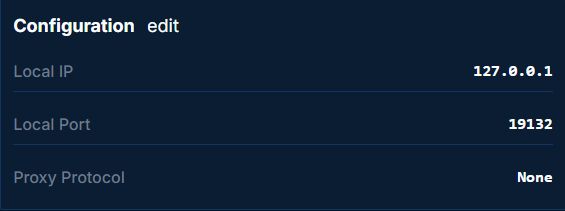
The TCP signaling service listens on:
*:19132
so the playit TCP tunnel can point to:
127.0.0.1:19132
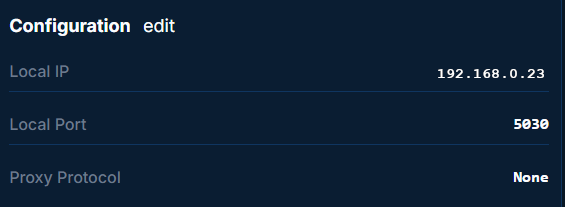
The UDP side does not bind to loopback in the same way, so the UDP tunnel needs to point to the server’s actual LAN address.
I also noticed the server always opens UDP port 7551. That appears to be a fixed NetherNet port and is separate from the configurable UDP range.
This is the configuration that worked for me:
services:
  minecraft:
    image: itzg/minecraft-bedrock-server:latest
    restart: unless-stopped
    network_mode: host
    volumes:
      - ./minecraft-data:/data
    environment:
      EULA: "TRUE"
      GAMEMODE: "survival"
      DIFFICULTY: "normal"
      MAX_PLAYERS: "10"
      VERSION: "LATEST"
      TRANSPORT: "nethernet"
      SERVER_UDP_PORTS: "<playit-udp-tunnel-ip>:61226-61229:61226-61229"
    stdin_open: true
    tty: true
Replace the example IP and UDP range with whatever playit.gg assigned to your UDP tunnel.
One other important detail: TRANSPORT, SERVER_UDP_PORTS, and SERVER_IP were added to the itzg image in builds from 2026-09-17 onward as part of PR #675.
If you’re running an older image, those environment variables may simply be ignored.
That newer image also changes the container healthcheck to use /v1/join when NetherNet is enabled.
On the playit side, I ended up using two tunnels.
The first is a TCP tunnel with a port count of 1, pointing to:
127.0.0.1:19132
This handles the initial NetherNet handshake and server information.
This is also the hostname and port that players actually enter in Minecraft.
If you use a custom hostname, this is the tunnel I would attach it to.
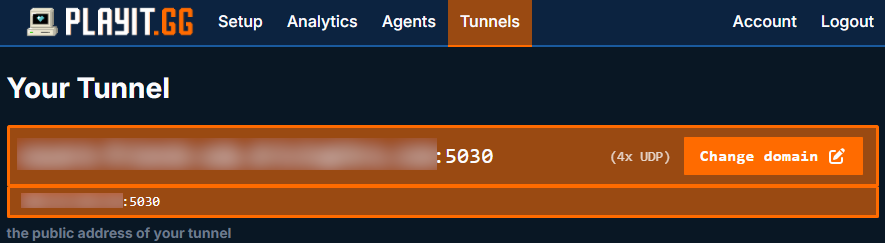
The second is a UDP tunnel with a port count of 4, pointing to:
<server-lan-ip>:61226
Replace 61226 with the first port assigned by playit.
For example, if playit assigns:
61226-61229
then the Minecraft server should also be configured to use:
61226-61229
because of the same-port requirement described above.
Players never manually enter the UDP tunnel address. The server advertises that information through NetherNet.
Once the TCP and UDP tunnels are working, the old legacy Bedrock UDP tunnel should no longer be necessary.
You can test the signaling side without opening Minecraft.
From another machine, run:
curl http://<your-tunnel-domain>:<tcp-port>/v1/join
A working response should look similar to:
{"name":"...","protocol":2193,"version":"1.26.51","level":"...","players":0,"maxPlayers":10,"gameType":0}
If you get JSON back, the TCP signaling path is working.
If the request times out, focus on the TCP tunnel.
If /v1/join works but remote players still fail during connection, focus on the UDP tunnel, UDP port range, and the server-udp-ports configuration.
One final useful detail: the itzg container also creates its own pre-upgrade backup under:
minecraft-data/backup-pre-<version>
when the server version changes.